Guía · 3 pasos
Crea juegos y artefactos con Claude
Cómo crear juegos y artefactos con Claude de forma sencilla y directa, paso a paso.
Crea juegos con IA en segundos: Guía de Claude + Artifacts
Descubre cómo usar Claude y la función 'Artifacts' de Anthropic para generar y jugar tus propios videojuegos de texto interactivos, ¡sin una sola línea de código!
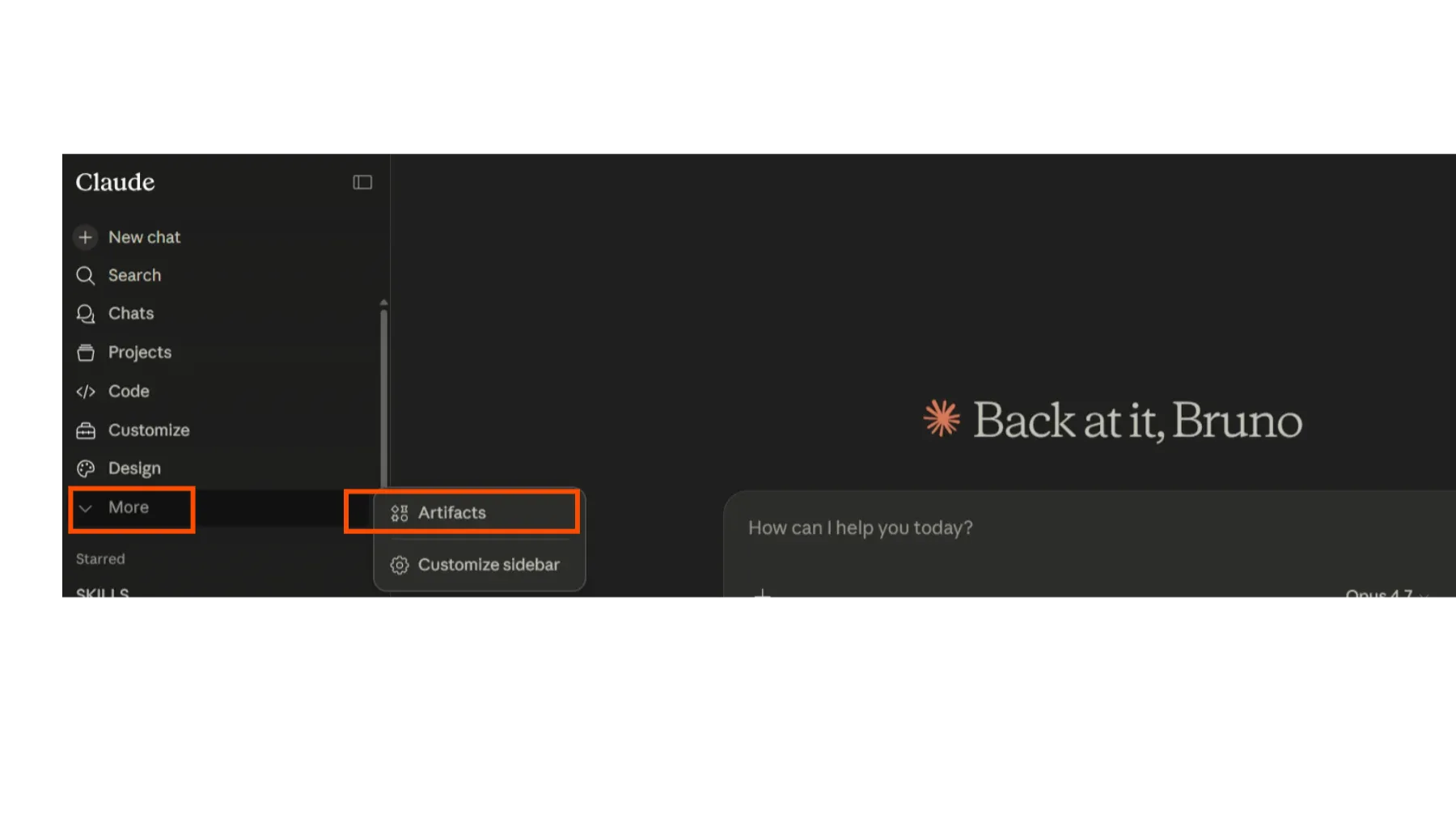
Paso 1: Entra a Artifacts en Claude
Lo primero es abrir Claude (asegúrate de tener acceso a las funciones más recientes). Busca el panel de 'Artifacts', generalmente a un lado de la conversación. Es donde aparecerán tus creaciones.
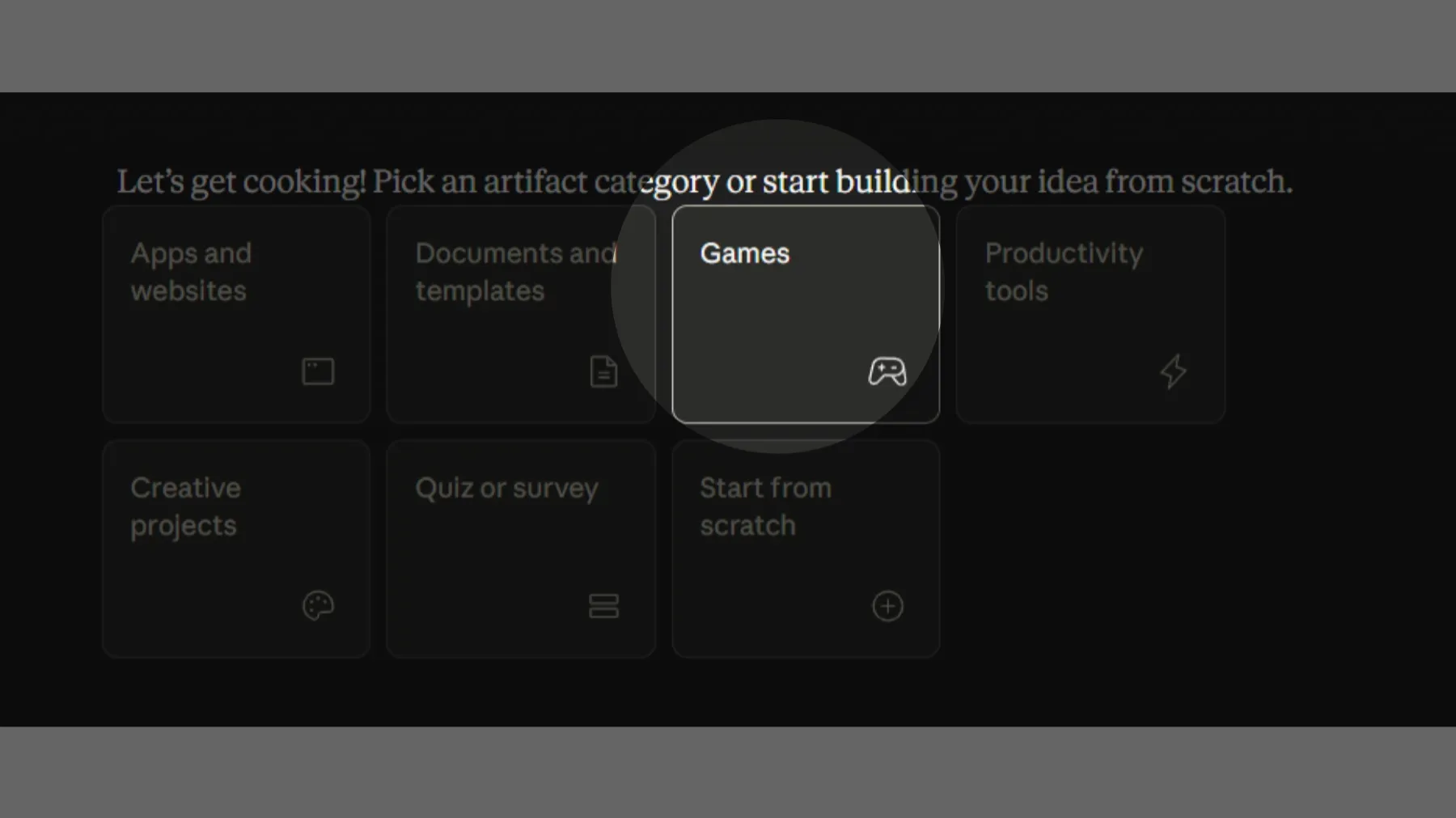
Paso 2: Elige 'Juego' y detalla tu idea
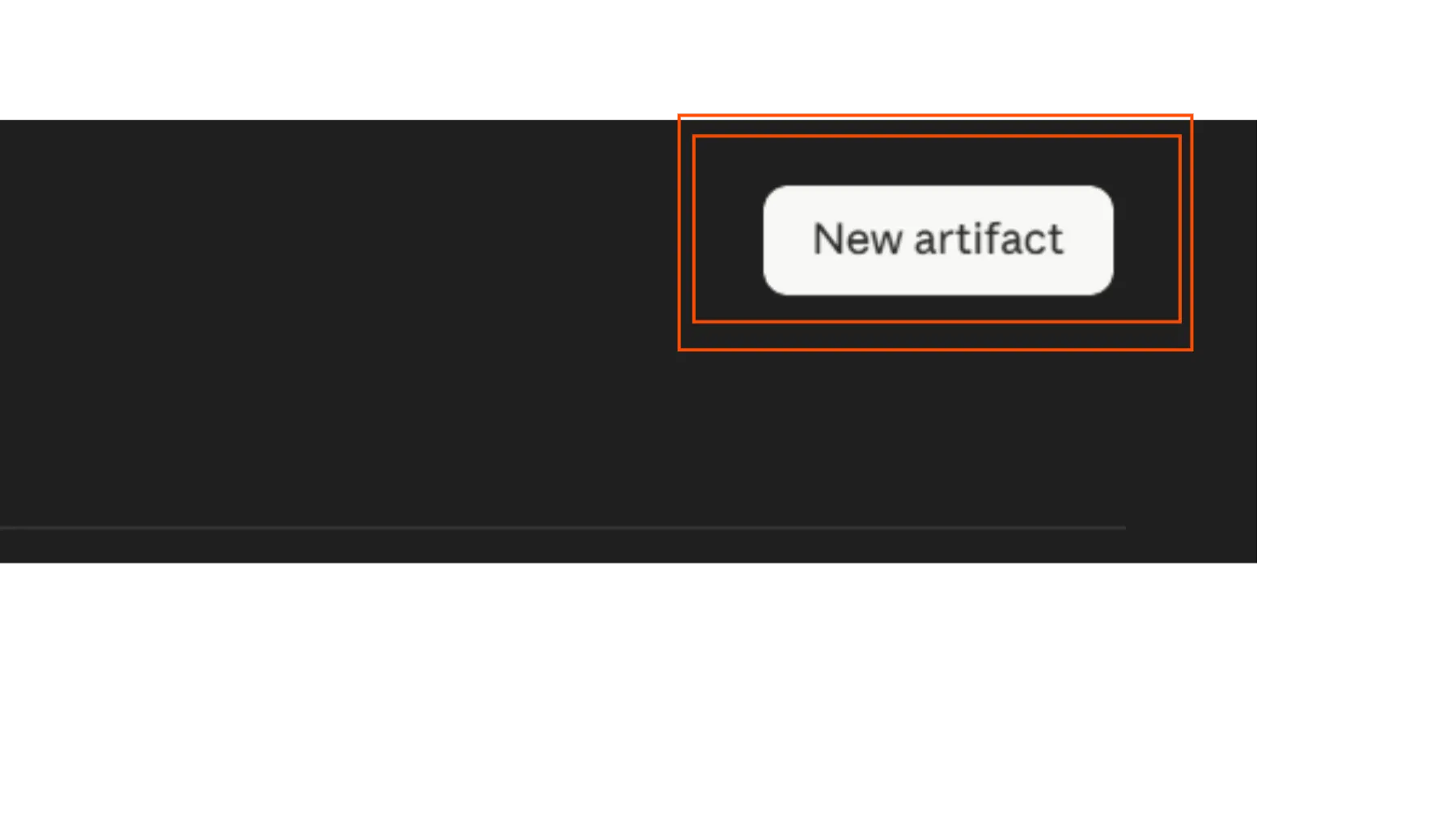
Dentro de Artifacts, selecciona la opción para crear un nuevo 'Juego'. Ahora viene lo divertido: escribe un prompt súper detallado describiendo el tipo de juego que quieres. Piensa en la temática, el objetivo, el estilo, los personajes, etc.
¿Un ejemplo de prompt?
# Prompt: Flappy Neon — Synthwave Flappy Bird
Build me a complete Flappy Bird-style game in a single HTML file (HTML + CSS + JavaScript, no external dependencies, no libraries) called **FLAPPY NEON**. It must work both on desktop and mobile, render full-screen, and have a polished synthwave/retrowave aesthetic — cinematic, premium, minimalist.
## Visual aesthetic (CRITICAL)
The entire game must feel like an 80s synthwave / outrun music video. Use this exact color palette:
- Deep purple/black background: `#0a0014`, `#1a0033`, `#330055`, `#660066` (vertical gradient sky, dark at top fading to magenta-purple at horizon)
- Neon cyan: `#00ffff` (player, accents, HUD)
- Neon magenta: `#ff00ff` (pipes/obstacles, mountains)
- Hot pink/red: `#ff0080` (game over, danger)
- Orange/yellow accent: `#ffaa00` (beak, sun, boost)
Everything must have **glow effects** using canvas `shadowBlur` and `shadowColor`, plus CSS `text-shadow` and `box-shadow` for UI elements. Use the font `'Courier New', monospace` everywhere.
Apply a subtle CRT scanline overlay on top of everything (a fixed div with a repeating horizontal stripe gradient, `mix-blend-mode: multiply`, very subtle — maybe 12% opacity dark stripes every 4px).
## Background scene
The gameplay area background must contain (drawn each frame on canvas):
1. **Vertical sky gradient** from `#0a0014` (top) to `#660066` (horizon line)
2. **Twinkling stars** scattered across the upper portion — small white squares (size 0.3–1.8px) with `Math.sin(frame * 0.02 + offset)` twinkle animation, density proportional to screen area (around `W*H/8000` stars)
3. **A retrowave sun** positioned at roughly 75% horizontally, just above the ground:
   - Radial gradient glow around it (pink/magenta, fades to transparent)
   - Sun body with vertical gradient: orange `#ffaa00` at top → magenta `#ff0080` middle → dark magenta `#aa0066` bottom
   - Iconic synthwave horizontal stripes cutting across the bottom half of the sun (drawn as dark `#0a0014` rectangles, getting thicker and farther apart toward the bottom)
4. **Wireframe mountains** in magenta with `shadowBlur` glow, drawn as connected line segments forming jagged peaks. Should scroll slowly with parallax (slower than pipes — about 0.2x speed)
5. **Ground strip** at the bottom (about 80px tall):
   - Dark gradient `#1a0033` → `#000010`
   - A bright cyan neon line at the top edge with strong glow
   - Diagonal magenta grid lines forming a perspective effect, scrolling horizontally at game speed
   - A couple horizontal magenta lines across the ground
## The bird (player)
A glowing orb-style bird, NOT a pixel sprite:
- Body: radial gradient (white center → cyan → dark blue) circle, radius ~18px
- Strong cyan `shadowBlur` glow (around 25)
- A magenta wing (ellipse) on the side that flaps — animated using `Math.sin(frame * 0.4)` to change scale/rotation
- A small white eye with a dark pupil
- An orange triangular beak with its own glow
- Rotates based on vertical velocity: pointing up when flapping, tilting down when falling (`bird.rotation = clamp(vy * 0.1, -0.5, 1.2)`)
- Leaves a **trail of fading cyan circles** behind it as it moves — keep a queue of the last ~12 positions, each fading out and shrinking
## Pipes (obstacles)
Vertical pipes (one on top, one on bottom, with a gap to fly through):
- Width: 70px
- Gap between top and bottom pipe: 200px
- Horizontal spacing between pipe pairs: 280px
- Body: horizontal gradient `#660066` → `#ff00ff` → `#660066` (so they look 3D-cylindrical)
- Wider caps (20px tall, ~12px wider than the body) at the inner ends of each pipe — solid `#ff00ff`
- White edge stroke with magenta glow shadow
- Strong `shadowBlur` (around 20) with magenta `shadowColor`
## Physics
Tune these values carefully — the game should feel forgiving and floaty, NOT punishing:
- `GRAVITY = 0.28` (gentle pull down)
- `FLAP_POWER = -6.5` (upward velocity applied on flap)
- `MAX_FALL_SPEED = 7` (terminal velocity cap — even if you don't flap for a while, the bird should not accelerate infinitely; this is important so it doesn't feel like a brick falling)
- `PIPE_SPEED = 2.5` (horizontal scroll speed)
- The bird starts at roughly x = 30% of screen width, y = 45% of screen height
- **Hitbox is smaller than visual** — use `bird.radius * 0.65` for collision checks (the visual radius includes glow that shouldn't count toward collisions; otherwise it feels unfair)
- Ceiling: clamp the bird to stay on-screen at the top (don't kill on ceiling hit, just stop)
- Ground: collision with ground = game over
- Pipe collision = game over
## Game states
Four states: `start`, `ready`, `playing`, `gameover`.
1. **Start screen**: Big glitchy title "FLAPPY NEON" with a gradient text fill (cyan → magenta → pink), a subtitle "— Synthwave Flight —" in spaced uppercase magenta, a "PRESS START" button (transparent with cyan border, glow, monospace), and a hint at the bottom "SPACE · CLICK · TAP TO FLAP". Title should have a subtle random glitch animation (occasional 1-2px shifts).
2. **Ready screen**: After pressing start, show "TAP TO FLAP" text pulsing in the center. The bird hovers gently in place using `Math.sin(frame * 0.1) * 10` for the y position. Pipes are pre-spawned offscreen but not moving yet (or just scrolling without gameplay). The first input transitions to `playing`.
3. **Playing**: Normal gameplay. Big white score number at the top center with multi-layered glow (`text-shadow: 0 0 20px #00ffff, 0 0 40px #00ffff, 0 0 60px #ff00ff`). Each pipe passed = +1 score + a score sound.
4. **Game over**: Bird continues falling with rotation. Show "CRASHED" title in hot pink with glitch animation, final score, best score, and a "★ NEW RECORD ★" pulsing badge if applicable, plus a RETRY button. **CRUCIAL**: there's a 1-second delay before the game over UI appears (so the death animation plays). During that delay, if the user presses space/tap, it should cancel the pending game over screen and immediately restart the game — store the `setTimeout` ID and clear it on input.
## Audio (Web Audio API, no audio files)
Generate ALL audio procedurally using Web Audio API. Initialize on first user input (browsers require user gesture). Create:
1. **Synthwave background music loop** (~75 BPM, runs continuously during gameplay, stops on game over with a fade):
   - Bassline: sawtooth oscillator through a lowpass filter (cutoff ~600Hz, Q=8), playing root notes in an A minor progression. Notes (Hz): `[110, 110, 110, 110, 87.31, 87.31, 87.31, 87.31, 98, 98, 98, 98, 82.41, 82.41, 82.41, 82.41]` — play one every 2 steps (400ms each)
   - Lead arpeggio: two oscillators (square + sawtooth slightly detuned by 0.5%) through a lowpass filter (cutoff ~2000Hz). Notes for a 32-step pattern: `[440, 523.25, 659.25, 523.25, 440, 523.25, 659.25, 523.25, 349.23, 415.30, 523.25, 415.30, 349.23, 415.30, 523.25, 415.30, 392, 493.88, 587.33, 493.88, 392, 493.88, 587.33, 493.88, 329.63, 415.30, 493.88, 415.30, 329.63, 415.30, 493.88, 415.30]` — play one every step (200ms)
   - Kick drum on every 4th step (a sine oscillator sweeping from 120Hz down to 40Hz over 100ms)
   - Hi-hat on offbeats (white noise through highpass filter at 7000Hz, very short envelope ~50ms)
   - All routed through a master gain at 0.22 volume
   - Implement with a `setInterval` at 200ms step rate
2. **Flap sound**: Sine wave sweeping from 400Hz → 800Hz over 80ms, short envelope. Played every flap.
3. **Score sound**: Sine wave sweeping from 800Hz → 1200Hz over 100ms when passing a pipe.
4. **Crash sound**: White noise burst through a lowpass filter at 800Hz, 400ms decay envelope. Played once on game over, plus the music fades out over 300ms.
## Input handling
- Desktop: Space, ArrowUp, or Enter key → flap (also click anywhere on canvas)
- Mobile: Touch anywhere on canvas → flap
- All inputs call a unified `handleInput()` that routes based on state:
  - `start` → go to ready
  - `ready` or `playing` → flap
  - `gameover` → restart (and also cancel pending game over UI if it hasn't appeared yet)
- Prevent default on touch events to avoid scroll/zoom
## UI styling
- All buttons: transparent background, 2px cyan border, cyan text, monospace, uppercase, spaced letters (0.3em), padding `16px 40px`, cyan box-shadow glow inside and outside, hover state that scales up 1.05x and intensifies the glow
- Titles use `clamp()` for responsive sizing (e.g., `clamp(44px, 9vw, 100px)` for the main title)
- Add a subtle glitch animation on titles using `@keyframes` that translates by ±1–2px at random intervals (90% of the time it's still, 10% it's glitching)
- Pulsing animations on "NEW RECORD" and "TAP TO FLAP" using opacity + scale
- All overlays are absolutely positioned, full screen, centered content, with `.hidden` and `.active` classes for show/hide and pointer-events control
## Responsiveness
- Canvas resizes to fill the viewport (`100vw × 100vh`)
- On window resize: re-init stars and mountains based on new dimensions
- Mobile-friendly: viewport meta with `user-scalable=no`, `-webkit-tap-highlight-color: transparent`, `user-select: none`
- All text uses `clamp()` for responsive font sizes
## High score
Store the best score in a JavaScript variable for the session (don't use localStorage since some environments block it). Show it on the game over screen. Show "★ NEW RECORD ★" with pulse animation when current score beats it.
## Particle effects
- On flap: emit ~6 small cyan particles behind the bird that fade and fall
- On crash: emit ~25 particles (alternating hot pink and orange) exploding outward from the bird's position with gravity
- Particles have `x, y, vx, vy, life, size, color`, updated each frame, removed when `life <= 0`
- Render with `shadowBlur` glow matching their color
## Screen shake
On crash, apply a small screen shake (`shake = 10`, decaying by `shake *= 0.75` each frame). Translate the canvas context by random offsets within the shake range. Keep it subtle, not overwhelming.
## File structure
Single self-contained `.html` file with:
- `<style>` block in head with all CSS
- `<body>` with the canvas, HUD divs, overlay screens (start, ready, game over), and scanline div
- `<script>` at the end, wrapped in an IIFE `(() => { ... })()`, with all game logic
## Final notes
Make it feel cinematic and premium — every detail should reinforce the synthwave aesthetic. The game should be IMMEDIATELY playable when opened, with no setup required. Focus on smooth 60fps rendering using `requestAnimationFrame`. The vibe is "if Drive (2011), Tron, and OutRun had a baby." Don't add tutorials or instructions screens beyond the minimal hints already specified. Don't use any external assets, fonts, or libraries — everything from scratch in pure HTML/CSS/JS.
Make it fun, fair, and beautiful. Ship it.
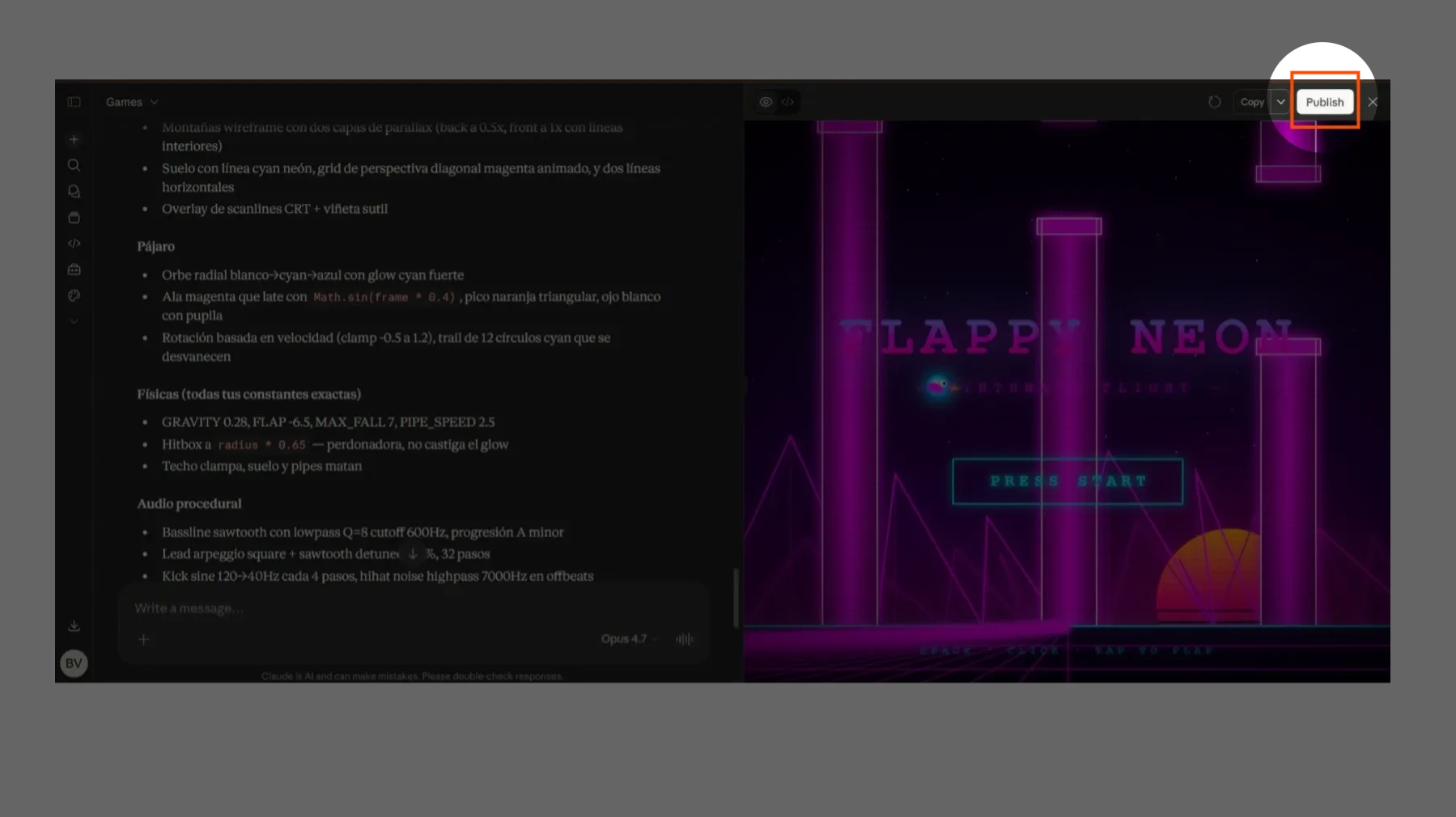
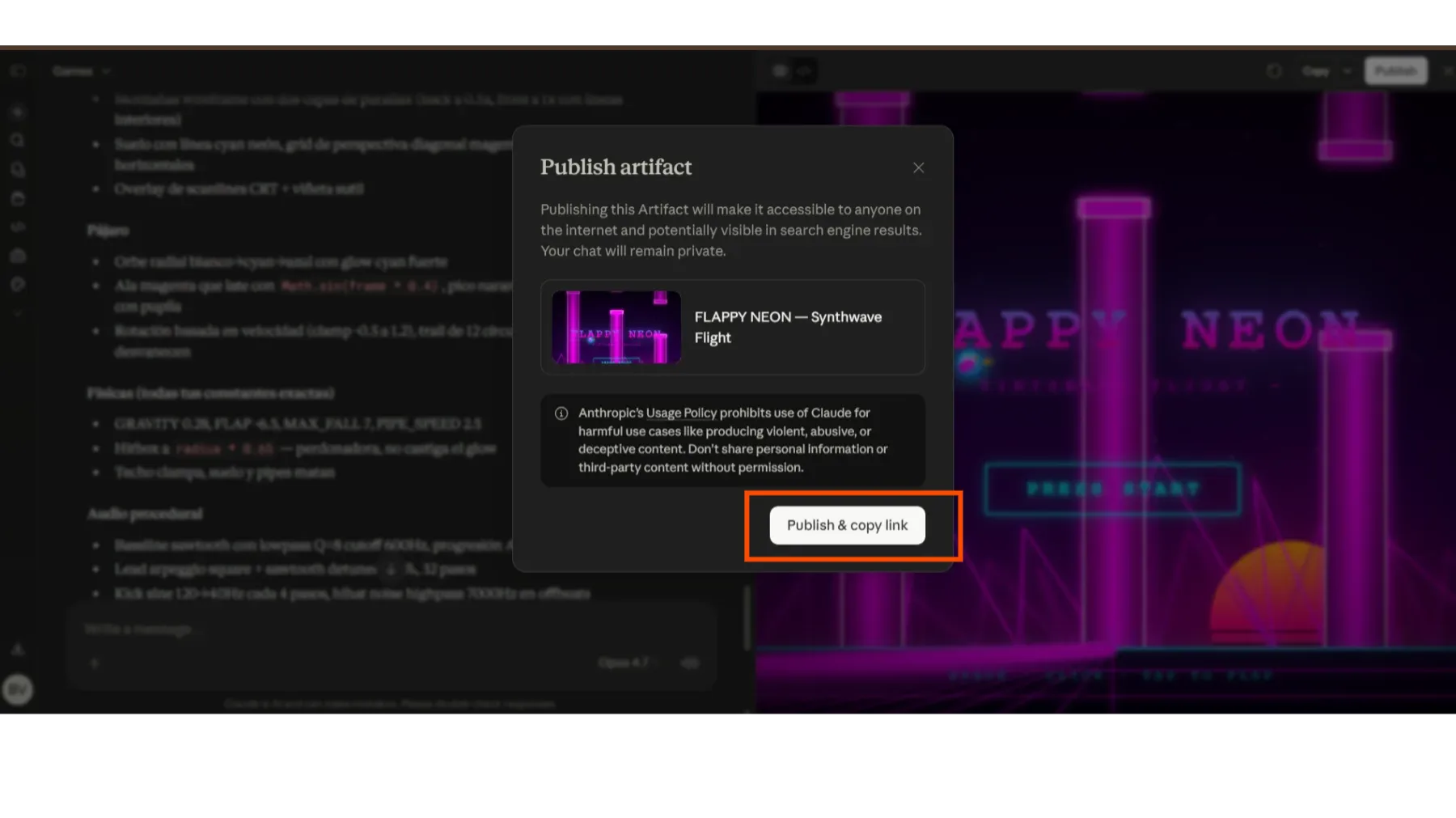
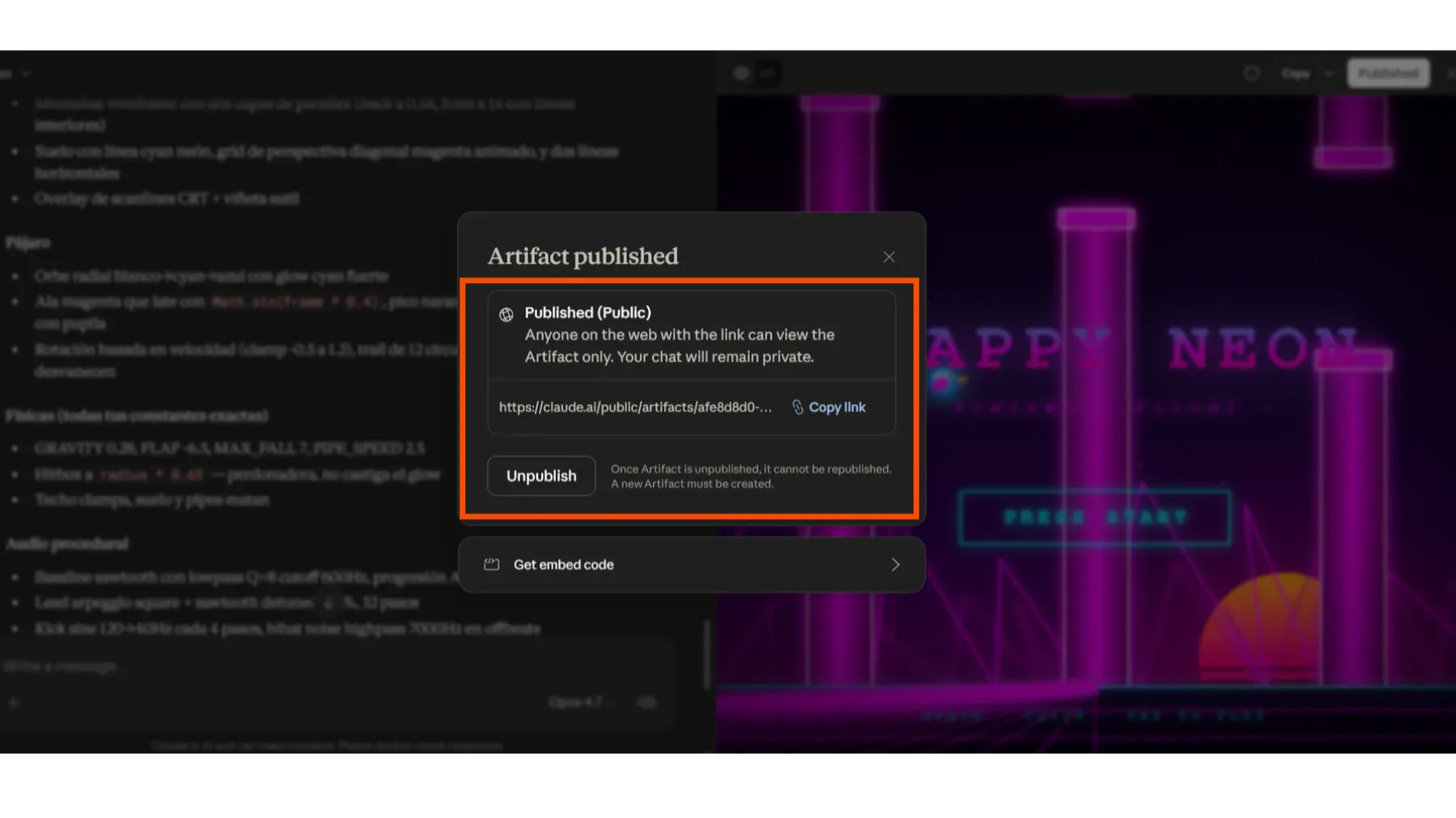
Paso 3: Publica y Comparte tu Juego
Cuando estés contento con el resultado final, busca la opción para 'Publicar' o 'Compartir' tu Artifact. Esto generará un enlace que puedes compartir con tus amigos o con la comunidad para que cualquiera pueda jugar tu creación.
¡Juega mi creación! — ¿Quieres ver un ejemplo de lo que puedes crear? ¡Aquí te dejo el link a uno de mis juegos!
¿Necesitas ayuda con tu proyecto? Si quieres llevar tus ideas al siguiente nivel con IA, mándame un mensaje. ¡Estoy aquí para ayudarte a crear cosas increíbles!