Guide · 3 steps
Build games and artifacts with Claude
How to build games and artifacts with Claude, simply and directly, step by step.
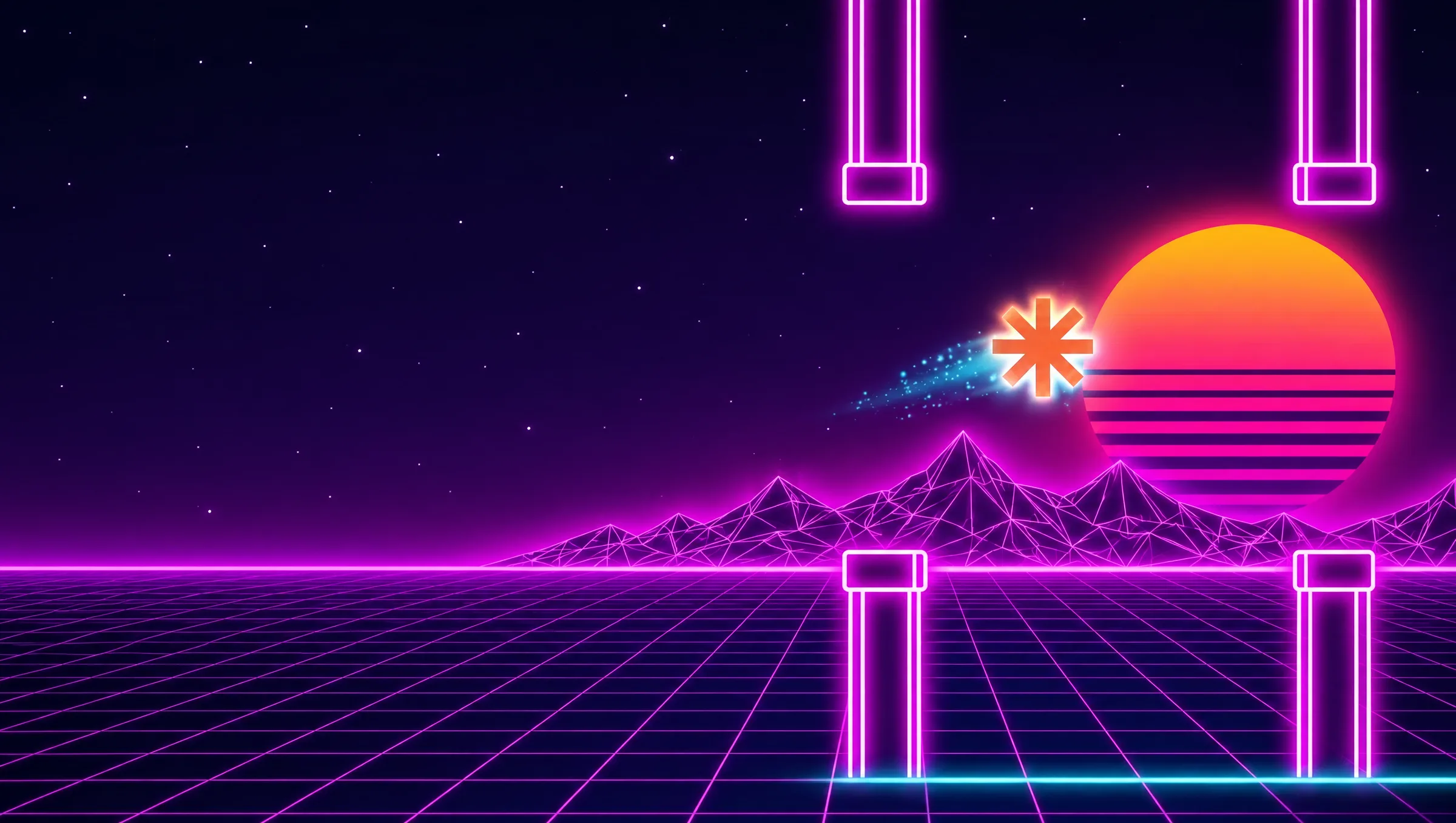
Make AI games in seconds: a guide to Claude + Artifacts
Learn how to use Claude and Anthropic's Artifacts feature to create and play your own interactive text-based video games, without writing a single line of code!
Step 1: Open Artifacts in Claude
First, open Claude (make sure you have access to the latest features). Look for the 'Artifacts' panel, usually next to the conversation. That's where your creations will show up.
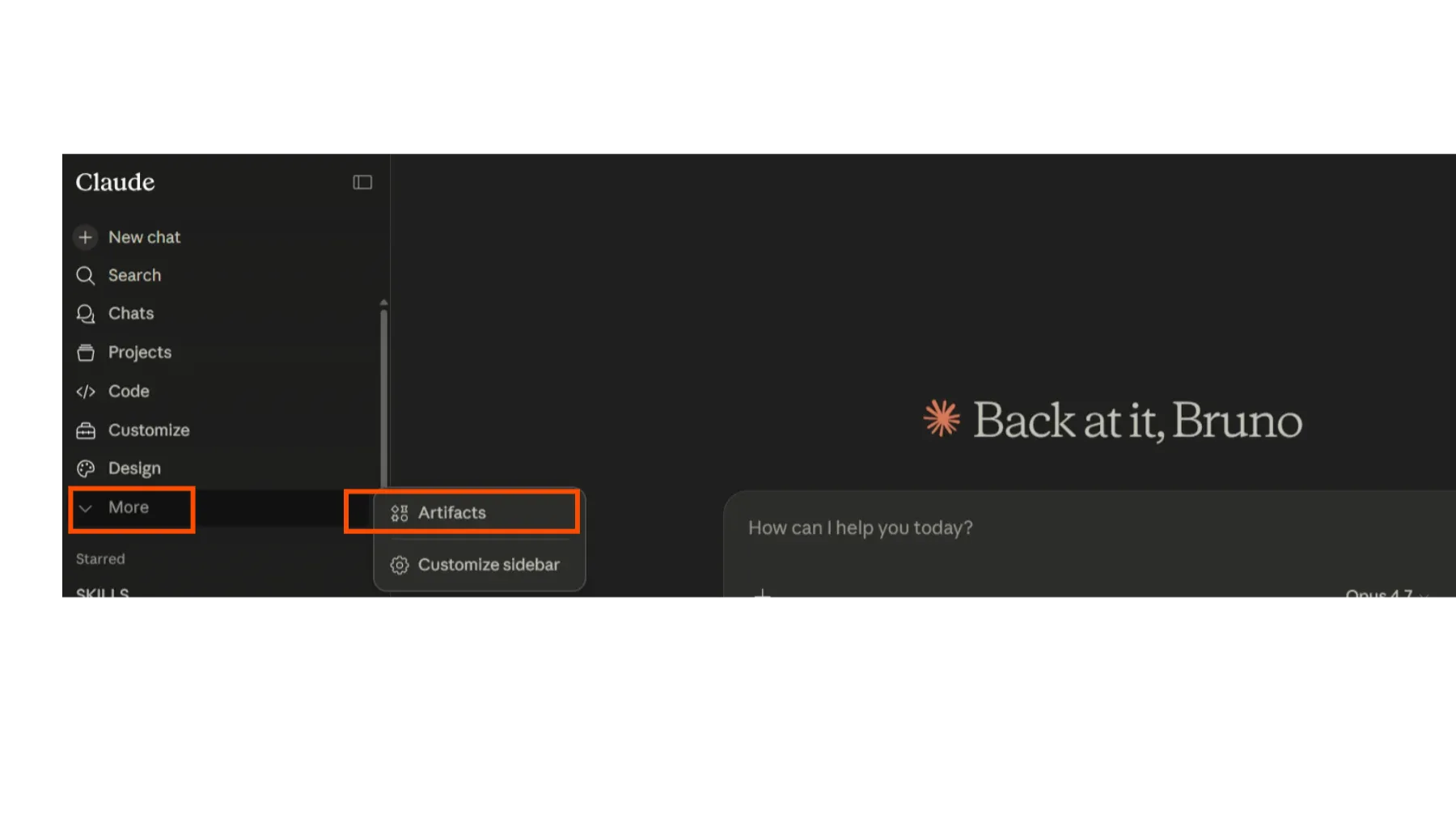
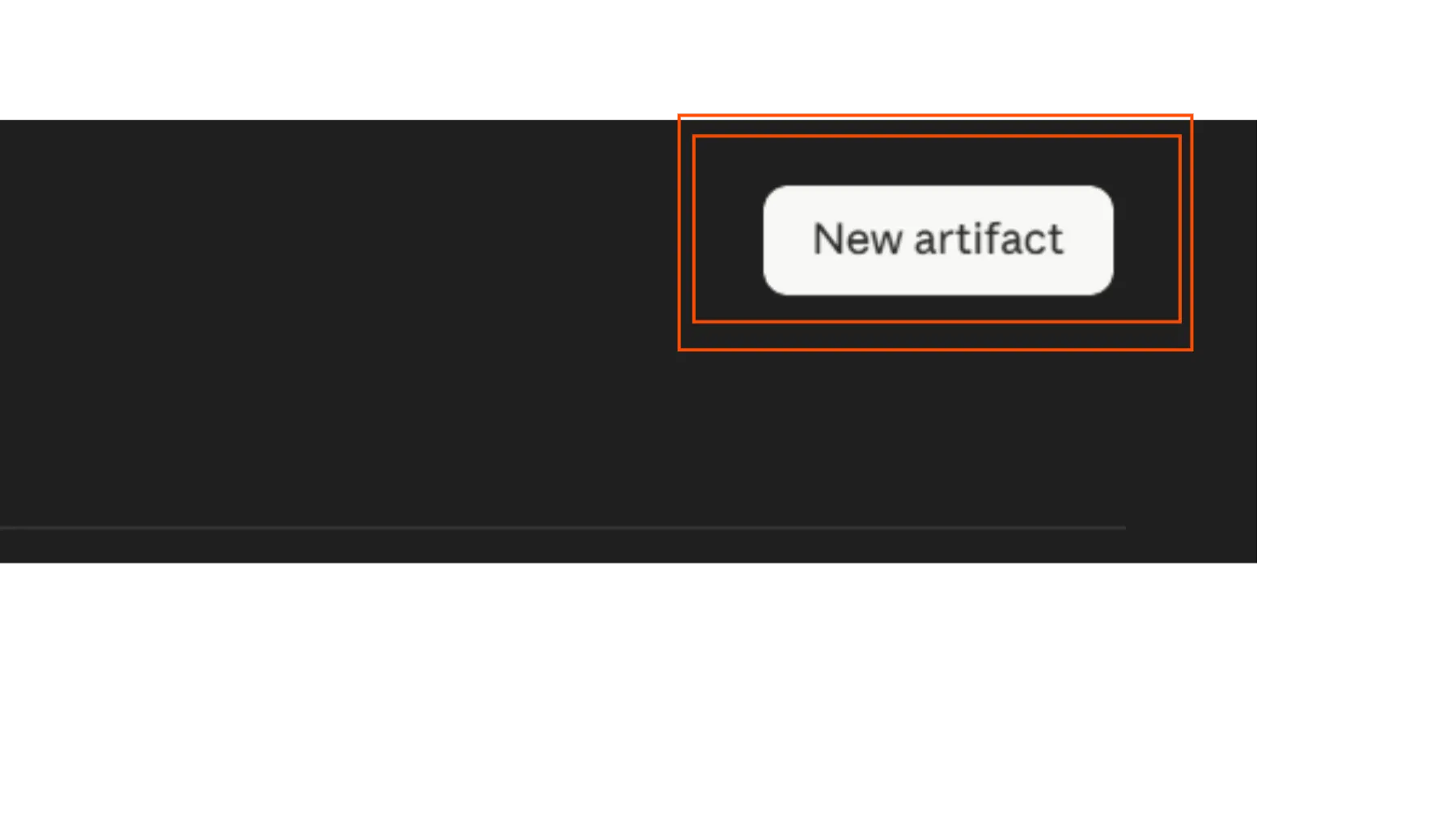
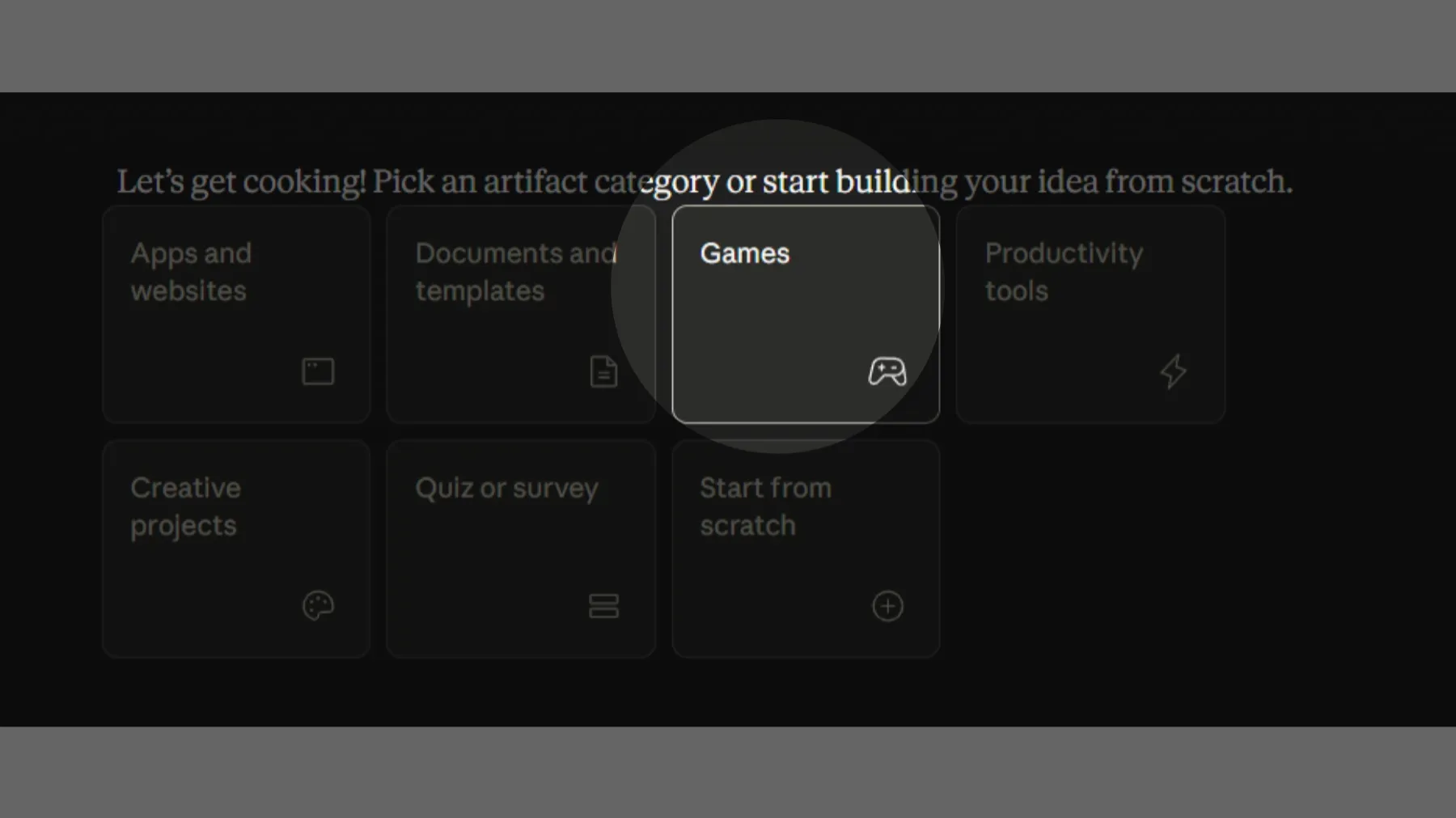
Step 2: Pick 'Game' and describe your idea
Inside Artifacts, select the option to create a new 'Game'. Now for the fun part: write a really detailed prompt describing the kind of game you want. Think about the theme, the goal, the style, the characters and so on.
Want an example prompt?
# Prompt: Flappy Neon — Synthwave Flappy Bird
Build me a complete Flappy Bird-style game in a single HTML file (HTML + CSS + JavaScript, no external dependencies, no libraries) called **FLAPPY NEON**. It must work both on desktop and mobile, render full-screen, and have a polished synthwave/retrowave aesthetic — cinematic, premium, minimalist.
## Visual aesthetic (CRITICAL)
The entire game must feel like an 80s synthwave / outrun music video. Use this exact color palette:
- Deep purple/black background: `#0a0014`, `#1a0033`, `#330055`, `#660066` (vertical gradient sky, dark at top fading to magenta-purple at horizon)
- Neon cyan: `#00ffff` (player, accents, HUD)
- Neon magenta: `#ff00ff` (pipes/obstacles, mountains)
- Hot pink/red: `#ff0080` (game over, danger)
- Orange/yellow accent: `#ffaa00` (beak, sun, boost)
Everything must have **glow effects** using canvas `shadowBlur` and `shadowColor`, plus CSS `text-shadow` and `box-shadow` for UI elements. Use the font `'Courier New', monospace` everywhere.
Apply a subtle CRT scanline overlay on top of everything (a fixed div with a repeating horizontal stripe gradient, `mix-blend-mode: multiply`, very subtle — maybe 12% opacity dark stripes every 4px).
## Background scene
The gameplay area background must contain (drawn each frame on canvas):
1. **Vertical sky gradient** from `#0a0014` (top) to `#660066` (horizon line)
2. **Twinkling stars** scattered across the upper portion — small white squares (size 0.3–1.8px) with `Math.sin(frame * 0.02 + offset)` twinkle animation, density proportional to screen area (around `W*H/8000` stars)
3. **A retrowave sun** positioned at roughly 75% horizontally, just above the ground:
   - Radial gradient glow around it (pink/magenta, fades to transparent)
   - Sun body with vertical gradient: orange `#ffaa00` at top → magenta `#ff0080` middle → dark magenta `#aa0066` bottom
   - Iconic synthwave horizontal stripes cutting across the bottom half of the sun (drawn as dark `#0a0014` rectangles, getting thicker and farther apart toward the bottom)
4. **Wireframe mountains** in magenta with `shadowBlur` glow, drawn as connected line segments forming jagged peaks. Should scroll slowly with parallax (slower than pipes — about 0.2x speed)
5. **Ground strip** at the bottom (about 80px tall):
   - Dark gradient `#1a0033` → `#000010`
   - A bright cyan neon line at the top edge with strong glow
   - Diagonal magenta grid lines forming a perspective effect, scrolling horizontally at game speed
   - A couple horizontal magenta lines across the ground
## The bird (player)
A glowing orb-style bird, NOT a pixel sprite:
- Body: radial gradient (white center → cyan → dark blue) circle, radius ~18px
- Strong cyan `shadowBlur` glow (around 25)
- A magenta wing (ellipse) on the side that flaps — animated using `Math.sin(frame * 0.4)` to change scale/rotation
- A small white eye with a dark pupil
- An orange triangular beak with its own glow
- Rotates based on vertical velocity: pointing up when flapping, tilting down when falling (`bird.rotation = clamp(vy * 0.1, -0.5, 1.2)`)
- Leaves a **trail of fading cyan circles** behind it as it moves — keep a queue of the last ~12 positions, each fading out and shrinking
## Pipes (obstacles)
Vertical pipes (one on top, one on bottom, with a gap to fly through):
- Width: 70px
- Gap between top and bottom pipe: 200px
- Horizontal spacing between pipe pairs: 280px
- Body: horizontal gradient `#660066` → `#ff00ff` → `#660066` (so they look 3D-cylindrical)
- Wider caps (20px tall, ~12px wider than the body) at the inner ends of each pipe — solid `#ff00ff`
- White edge stroke with magenta glow shadow
- Strong `shadowBlur` (around 20) with magenta `shadowColor`
## Physics
Tune these values carefully — the game should feel forgiving and floaty, NOT punishing:
- `GRAVITY = 0.28` (gentle pull down)
- `FLAP_POWER = -6.5` (upward velocity applied on flap)
- `MAX_FALL_SPEED = 7` (terminal velocity cap — even if you don't flap for a while, the bird should not accelerate infinitely; this is important so it doesn't feel like a brick falling)
- `PIPE_SPEED = 2.5` (horizontal scroll speed)
- The bird starts at roughly x = 30% of screen width, y = 45% of screen height
- **Hitbox is smaller than visual** — use `bird.radius * 0.65` for collision checks (the visual radius includes glow that shouldn't count toward collisions; otherwise it feels unfair)
- Ceiling: clamp the bird to stay on-screen at the top (don't kill on ceiling hit, just stop)
- Ground: collision with ground = game over
- Pipe collision = game over
## Game states
Four states: `start`, `ready`, `playing`, `gameover`.
1. **Start screen**: Big glitchy title "FLAPPY NEON" with a gradient text fill (cyan → magenta → pink), a subtitle "— Synthwave Flight —" in spaced uppercase magenta, a "PRESS START" button (transparent with cyan border, glow, monospace), and a hint at the bottom "SPACE · CLICK · TAP TO FLAP". Title should have a subtle random glitch animation (occasional 1-2px shifts).
2. **Ready screen**: After pressing start, show "TAP TO FLAP" text pulsing in the center. The bird hovers gently in place using `Math.sin(frame * 0.1) * 10` for the y position. Pipes are pre-spawned offscreen but not moving yet (or just scrolling without gameplay). The first input transitions to `playing`.
3. **Playing**: Normal gameplay. Big white score number at the top center with multi-layered glow (`text-shadow: 0 0 20px #00ffff, 0 0 40px #00ffff, 0 0 60px #ff00ff`). Each pipe passed = +1 score + a score sound.
4. **Game over**: Bird continues falling with rotation. Show "CRASHED" title in hot pink with glitch animation, final score, best score, and a "★ NEW RECORD ★" pulsing badge if applicable, plus a RETRY button. **CRUCIAL**: there's a 1-second delay before the game over UI appears (so the death animation plays). During that delay, if the user presses space/tap, it should cancel the pending game over screen and immediately restart the game — store the `setTimeout` ID and clear it on input.
## Audio (Web Audio API, no audio files)
Generate ALL audio procedurally using Web Audio API. Initialize on first user input (browsers require user gesture). Create:
1. **Synthwave background music loop** (~75 BPM, runs continuously during gameplay, stops on game over with a fade):
   - Bassline: sawtooth oscillator through a lowpass filter (cutoff ~600Hz, Q=8), playing root notes in an A minor progression. Notes (Hz): `[110, 110, 110, 110, 87.31, 87.31, 87.31, 87.31, 98, 98, 98, 98, 82.41, 82.41, 82.41, 82.41]` — play one every 2 steps (400ms each)
   - Lead arpeggio: two oscillators (square + sawtooth slightly detuned by 0.5%) through a lowpass filter (cutoff ~2000Hz). Notes for a 32-step pattern: `[440, 523.25, 659.25, 523.25, 440, 523.25, 659.25, 523.25, 349.23, 415.30, 523.25, 415.30, 349.23, 415.30, 523.25, 415.30, 392, 493.88, 587.33, 493.88, 392, 493.88, 587.33, 493.88, 329.63, 415.30, 493.88, 415.30, 329.63, 415.30, 493.88, 415.30]` — play one every step (200ms)
   - Kick drum on every 4th step (a sine oscillator sweeping from 120Hz down to 40Hz over 100ms)
   - Hi-hat on offbeats (white noise through highpass filter at 7000Hz, very short envelope ~50ms)
   - All routed through a master gain at 0.22 volume
   - Implement with a `setInterval` at 200ms step rate
2. **Flap sound**: Sine wave sweeping from 400Hz → 800Hz over 80ms, short envelope. Played every flap.
3. **Score sound**: Sine wave sweeping from 800Hz → 1200Hz over 100ms when passing a pipe.
4. **Crash sound**: White noise burst through a lowpass filter at 800Hz, 400ms decay envelope. Played once on game over, plus the music fades out over 300ms.
## Input handling
- Desktop: Space, ArrowUp, or Enter key → flap (also click anywhere on canvas)
- Mobile: Touch anywhere on canvas → flap
- All inputs call a unified `handleInput()` that routes based on state:
  - `start` → go to ready
  - `ready` or `playing` → flap
  - `gameover` → restart (and also cancel pending game over UI if it hasn't appeared yet)
- Prevent default on touch events to avoid scroll/zoom
## UI styling
- All buttons: transparent background, 2px cyan border, cyan text, monospace, uppercase, spaced letters (0.3em), padding `16px 40px`, cyan box-shadow glow inside and outside, hover state that scales up 1.05x and intensifies the glow
- Titles use `clamp()` for responsive sizing (e.g., `clamp(44px, 9vw, 100px)` for the main title)
- Add a subtle glitch animation on titles using `@keyframes` that translates by ±1–2px at random intervals (90% of the time it's still, 10% it's glitching)
- Pulsing animations on "NEW RECORD" and "TAP TO FLAP" using opacity + scale
- All overlays are absolutely positioned, full screen, centered content, with `.hidden` and `.active` classes for show/hide and pointer-events control
## Responsiveness
- Canvas resizes to fill the viewport (`100vw × 100vh`)
- On window resize: re-init stars and mountains based on new dimensions
- Mobile-friendly: viewport meta with `user-scalable=no`, `-webkit-tap-highlight-color: transparent`, `user-select: none`
- All text uses `clamp()` for responsive font sizes
## High score
Store the best score in a JavaScript variable for the session (don't use localStorage since some environments block it). Show it on the game over screen. Show "★ NEW RECORD ★" with pulse animation when current score beats it.
## Particle effects
- On flap: emit ~6 small cyan particles behind the bird that fade and fall
- On crash: emit ~25 particles (alternating hot pink and orange) exploding outward from the bird's position with gravity
- Particles have `x, y, vx, vy, life, size, color`, updated each frame, removed when `life <= 0`
- Render with `shadowBlur` glow matching their color
## Screen shake
On crash, apply a small screen shake (`shake = 10`, decaying by `shake *= 0.75` each frame). Translate the canvas context by random offsets within the shake range. Keep it subtle, not overwhelming.
## File structure
Single self-contained `.html` file with:
- `<style>` block in head with all CSS
- `<body>` with the canvas, HUD divs, overlay screens (start, ready, game over), and scanline div
- `<script>` at the end, wrapped in an IIFE `(() => { ... })()`, with all game logic
## Final notes
Make it feel cinematic and premium — every detail should reinforce the synthwave aesthetic. The game should be IMMEDIATELY playable when opened, with no setup required. Focus on smooth 60fps rendering using `requestAnimationFrame`. The vibe is "if Drive (2011), Tron, and OutRun had a baby." Don't add tutorials or instructions screens beyond the minimal hints already specified. Don't use any external assets, fonts, or libraries — everything from scratch in pure HTML/CSS/JS.
Make it fun, fair, and beautiful. Ship it.
Step 3: Publish and share your game
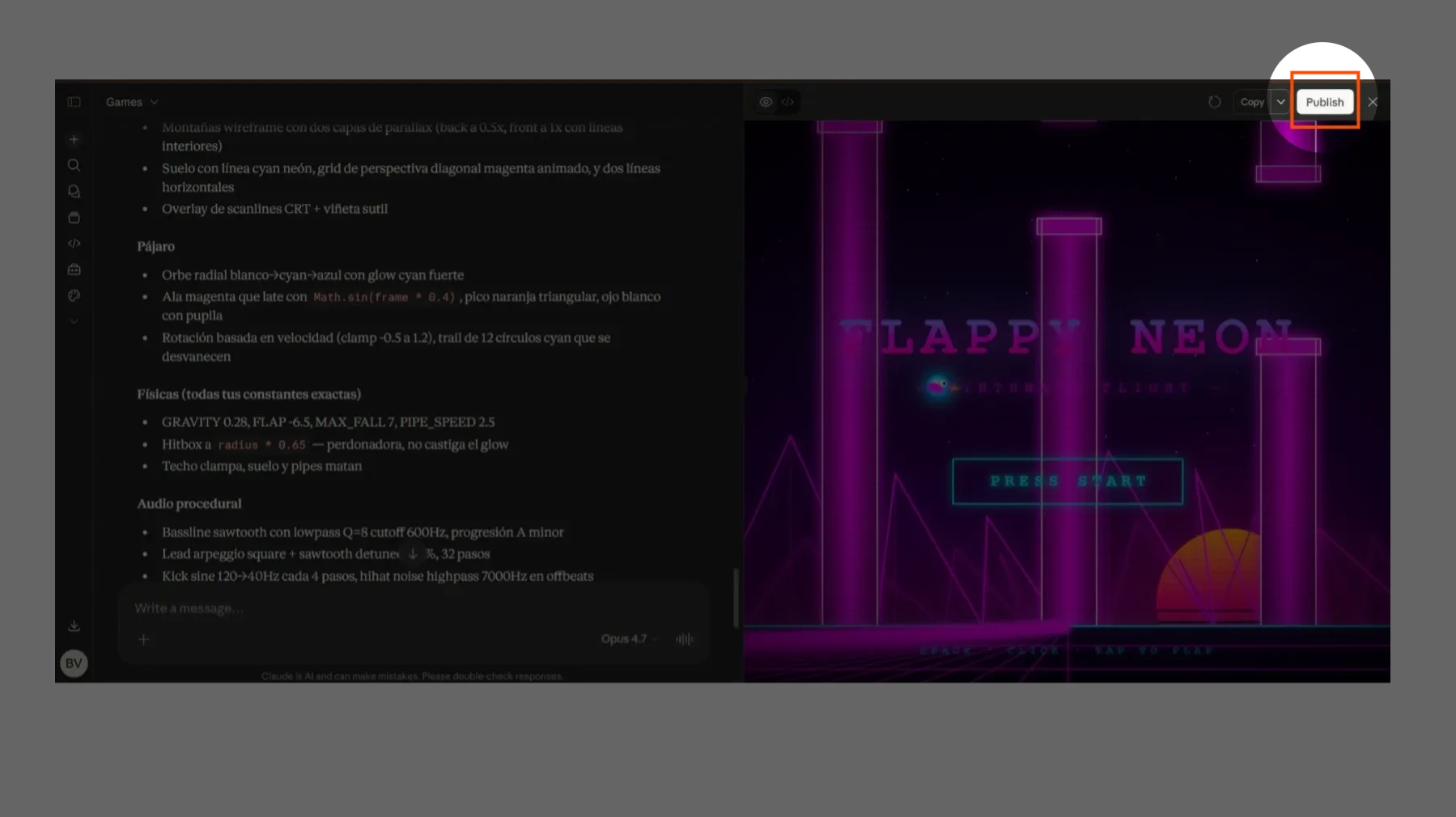
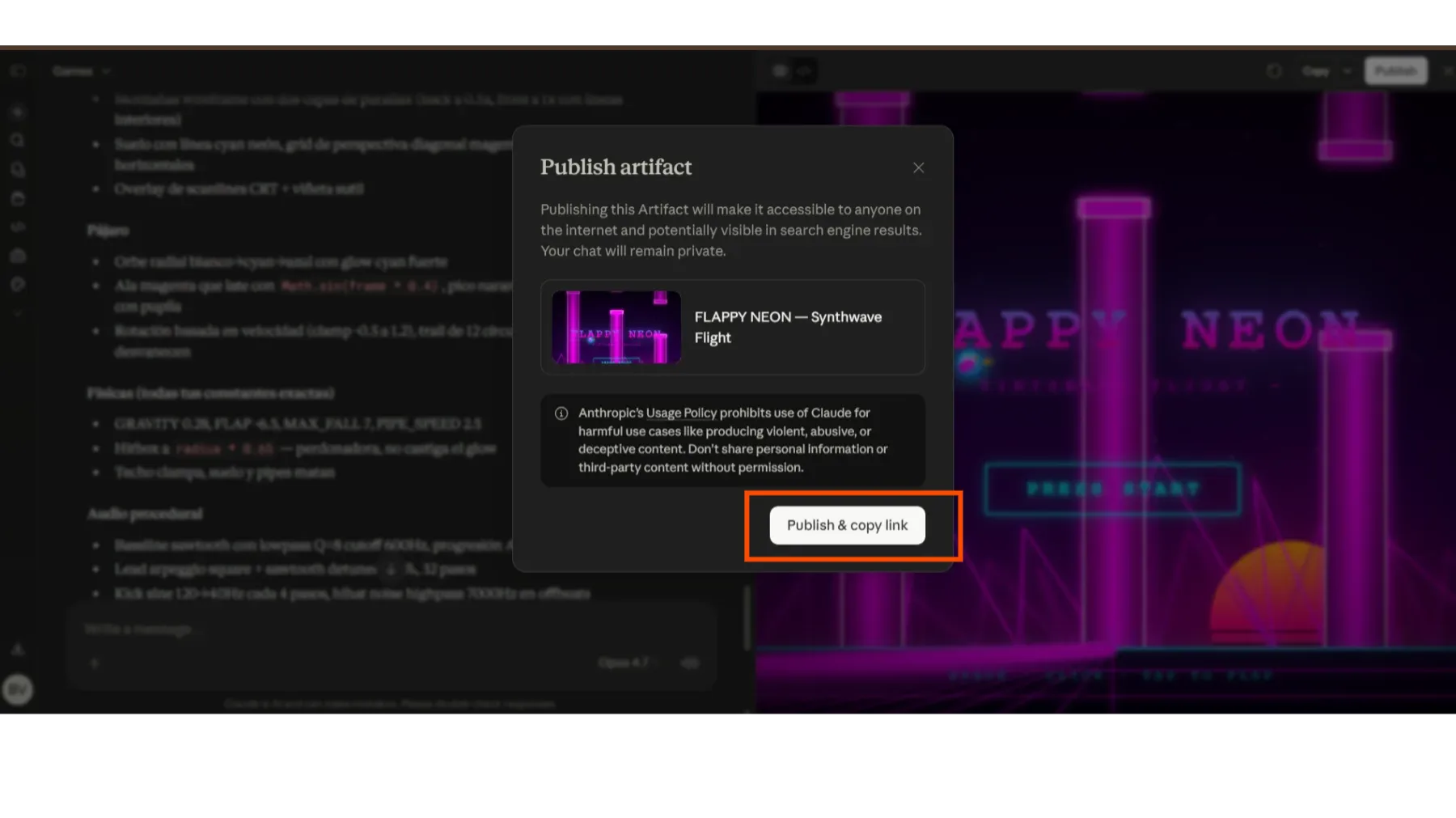
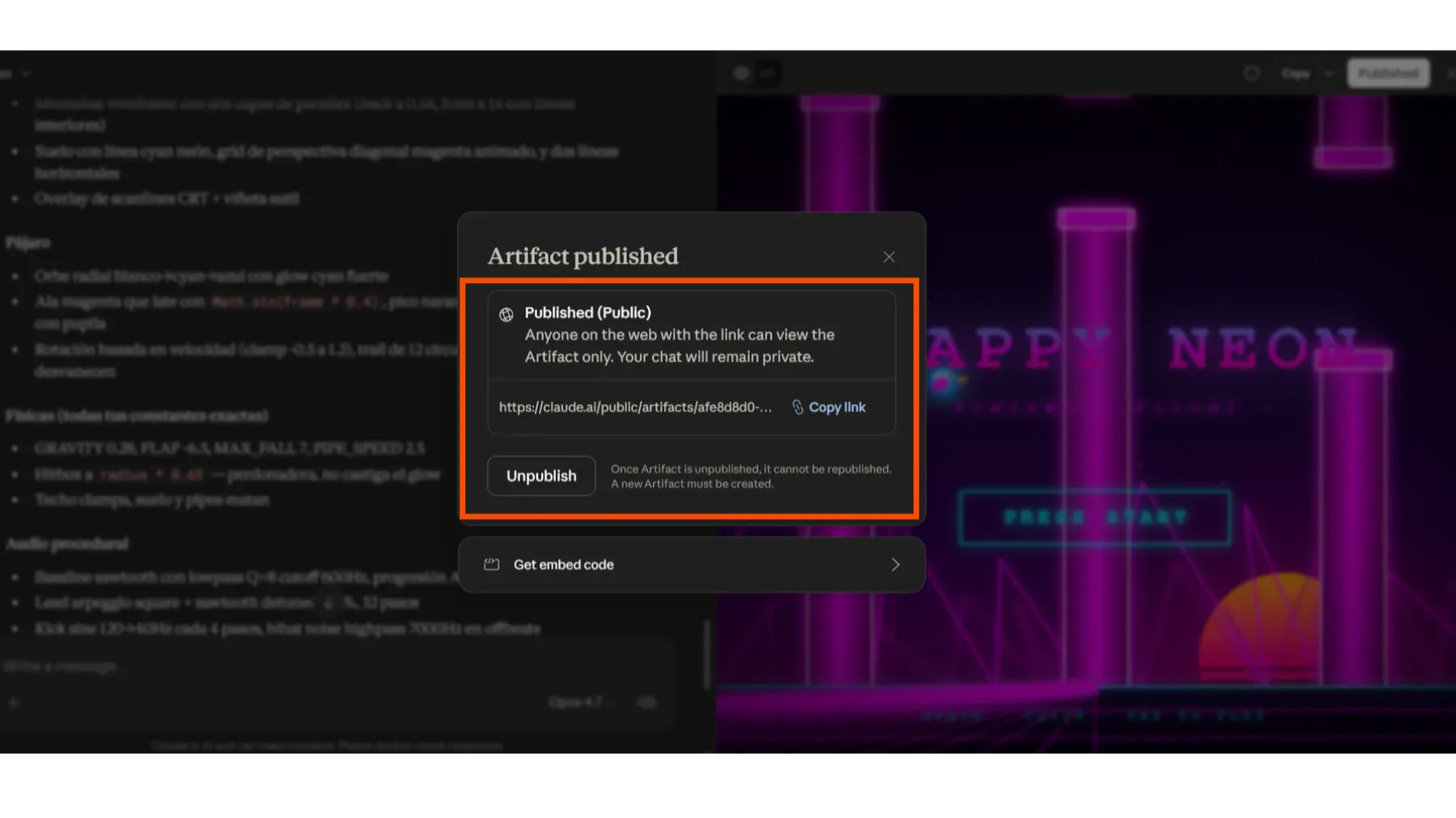
When you're happy with the final result, look for the option to 'Publish' or 'Share' your Artifact. That creates a link you can send to your friends or the community so anyone can play what you made.
Play my creation! — Want to see an example of what you can make? Here's the link to one of my games!
Need help with your project? If you want to take your ideas further with AI, send me a message. I'm here to help you build great things!